Getting startedQuick start
Quick start
The quickest way to try resin is the playground: it runs in your browser and needs nothing installed. This page sets resin up on your machine, for schemas you keep in a repository.
Install
Install @jhzlo/resin from npm in the project that keeps your schemas. It needs Node 22.18 or newer. Drawing needs elkjs, the layout engine, installed next to it:
npm install --save-dev @jhzlo/resin elkjs
This puts the resin command in the project, run with npx resin. Install it first: in a project without it, npx resin fetches an unrelated npm package of that name. The same package is the library, for using resin in code.
Draw a file
Save a schema as shop.erd:
table customers {
  id     bigint        pk
  email  varchar(255)  uk
}

table orders {
  id           bigint    pk
  customer_id  bigint    -> customers
  placed_at    datetime
}
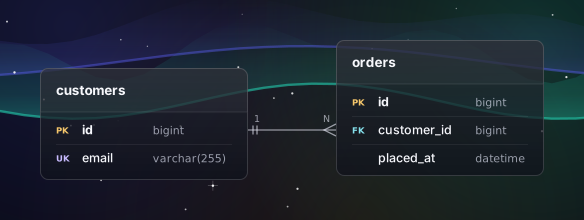
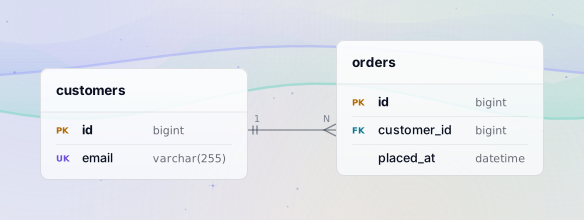
Then draw it. resin prints the SVG to standard output:
npx resin shop.erd > shop.svg
npx resin shop.erd --look aurora-dark > shop.dark.svg
By default the SVG has no background, so it reads on light and dark pages alike. Command line lists every option.
When something is wrong
Suppose the reference names a table that is not there:
table orders {
  id           bigint    pk
  customer_id  bigint    -> customer
  placed_at    datetime
}
resin reports it in compiler format, with the line, the column, a pointer to the spot and, most of the time, a hint:
shop.erd:3:29: error: referenced table `customer` is not in this document
  |
3 |   customer_id  bigint    -> customer
  |                             ^^^^^^^^
  = hint: declare it with `external table` if it lives outside this document
It keeps reading after an error, so one run reports several. When there is any error it prints no diagram and exits with status 1. Diagnostics lists the messages.