Getting startedIntroduction
Introduction
resin is a small language for entity-relationship diagrams. You describe a schema the way you would read its DDL, and resin checks what you wrote and draws it as an SVG where every reference runs from the column that holds it to the column it points at.
The 16-second demo shows the workflow from pasted DDL to an ERD. Its video follows the site's light or dark theme, including your system setting in Auto mode. Changing the theme keeps your playback position.
A first diagram
table users "Accounts" {
  id     bigint        pk
  email  varchar(255)  uk
}

table orders "Customer orders" {
  id       bigint  pk
  user_id  bigint  -> users  "Who placed it"
  memo     text?
}

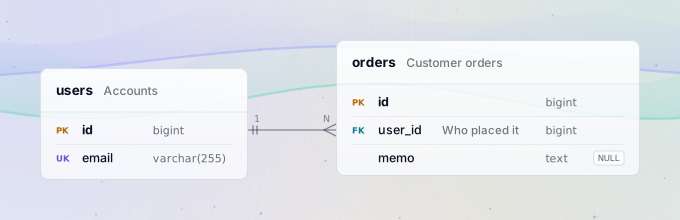
Each line inside a table is a column: its name, then its type, then what is true about it. pk and uk are keys. -> is a foreign key; without a column after the table name it points at the primary key, users.id. text? makes memo nullable, and every column without ? is NOT NULL.
Facts, not comments
A schema diagram usually has no place for nullability, for the difference between a foreign key and a reference only the application keeps, or for indexes, so teams write them into notes that nobody checks.
In resin they are syntax. varchar? is nullable, ~> is a logical reference, index as idx_user_id names an index. A reference to a table that does not exist is an error with a line, a column and a hint, not a typo that ships.
resin is young, and the grammar may still change before 1.0. When it does, the parser recognizes the old form and tells you how to write it now.
Next steps
- Quick start: install resin and draw a file from the command line.
- Columns and types: types, nullability and the modifiers a column can carry.
- References: foreign keys, logical references, and how many rows sit on each side.
- The playground: try every example on this site in your browser.